Quick Answer: Integrating QuickBooks with your business checks is simpler than most businesses expect. Order QuickBooks-compatible check stock from Checkomatic with your business name, address, and bank details pre-printed. Load the paper into your laser or inkjet printer. Open QuickBooks' check printing module, enter your payment details, and print. QuickBooks handles the layout automatically because the check stock is pre-formatted to match QuickBooks' standard print dimensions. No alignment setup, no manual formatting, no figuring it out.
Why QuickBooks Integration Makes Business Check Printing Simple
At Checkomatic, our QuickBooks™ checks are compatible with all versions of QuickBooks™, Quicken, MYOB, Yardi, etc. as we understand the need to be software compatible in this technology-driven world. If your software is not listed, we will custom format your checks at no extra charge or find the easiest solutions.
Most software is integrative but makes you figure it out. Who has time for that? We take the hard work away from you by pre-printing your checks to display Quickbooks compatibility. Simply put, all you need to print these convenient custom checks is the QuickBooks software.
In addition to integrating with your Quickbooks™ software, the 8.5" x 11" checks are fully customizable as we will print your business' logo and information.
As highlighted in our most recent Youtube video, we offer customizable QuickBooks™ checks in various layouts as well as numerous color and background style options. Plus, these checks include pre-printed security features such as heat-sensitive ink, chemically sensitive paper, and much more.
Why QuickBooks Checks Are Ideal for Business
- Aids in accounting and bookkeeping
- Laser or inkjet compatible
- Accepted by all major banks
- Protects against fraud
- Standard security option
- High-security option
- Saves all inputted information in your QuickBooks™ or QBConnect account to easily track all services or transactions
- Pre-printed lines for manual or digital information input
- Hassle-free printing for your small business
Whether you require business checks for QuickBooks™ or simply need a service-oriented supplier of QuickBooks™ compatible checks, we've got all your needs covered. Browse our collection of fully customizable QuickBooks checks today. Don't forget to check out our generous discounts on bulk orders as well.
Which Versions of QuickBooks Work With Checkomatic Checks
As the original content correctly identifies, Checkomatic's QuickBooks checks are compatible with all versions of QuickBooks and a wide range of additional accounting platforms. Here is a specific breakdown for businesses running different software configurations.
| Software | Compatible? | Format Needed |
|---|---|---|
| QuickBooks Desktop Pro / Premier / Enterprise | ✅ All versions | Check-on-top or 3-on-a-page |
| QuickBooks Online | ✅ All plans | Check-on-top or 3-on-a-page |
| Quicken | ✅ Pre-formatted | Standard Quicken format |
| MYOB | ✅ Pre-formatted | Standard MYOB format |
| Yardi | ✅ Pre-formatted | Standard Yardi format |
| Other accounting software | ✅ Custom format at no charge | Contact Checkomatic |
For the complete guide to ordering checks online with your accounting software details, see order checks online: personal and business buyer guide.
QuickBooks Check Formats: Check-on-Top vs 3-on-a-Page
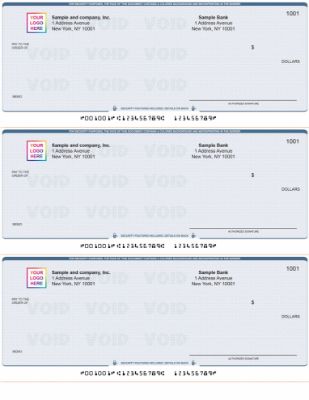
QuickBooks 3-on-a-page format from Checkomatic , three checks per sheet for high-volume AP and vendor payment runs.
As the original content correctly identifies, Checkomatic offers QuickBooks checks in various layouts. The two primary formats are check-on-top and 3-on-a-page. Choosing the right format depends on how your business uses QuickBooks for check printing.
Check-on-Top Format
Check-on-top is the standard QuickBooks check format. The check occupies the top third of the 8.5 x 11 inch sheet, with two detachable voucher stubs below it. One stub goes to the payee with the check as a remittance record. The other stub stays with the business as an accounting copy. This format provides the most remittance space of any QuickBooks check layout, making it ideal for AP vendor payments where detail about invoice numbers, line items, and payment references needs to be communicated to the payee alongside the payment itself. For the check-on-top format, see QuickBooks checks.
3-on-a-Page Format
3-on-a-page format places three separate checks on a single 8.5 x 11 inch sheet, each with a single stub. This format prints three payments per page rather than one, which reduces paper consumption for high-volume check runs. Businesses running large weekly or monthly AP batches, or payroll runs with many employees, often prefer 3-on-a-page because the per-check paper cost is lower and the batch processes faster. The remittance space per check is more limited than the check-on-top format, so this layout suits payments where the stub information is simple. For the 3-on-a-page format, see QuickBooks checks 3-on-a-page.
| Factor | Check-on-Top | 3-on-a-Page |
|---|---|---|
| Checks per sheet | 1 | 3 |
| Stubs per check | 2 (payee copy + business copy) | 1 per check |
| Remittance detail space | Full , ideal for detailed AP remittance | Limited , suits simple payments |
| Best for | AP vendor payments, complex remittance | High-volume payroll, simple AP runs |
| Paper cost | Higher per check | Lower per check |
How to Set Up QuickBooks to Print Your Checks
As the original content correctly identifies, all you need to print Checkomatic's QuickBooks checks is the QuickBooks software itself. Here is what the process looks like for a business setting up QuickBooks check printing for the first time.
What You Need Before You Start
- Your Checkomatic QuickBooks check stock: Loaded into your laser or inkjet printer. Both printer types work. Laser printers are preferred for sharp, consistent MICR line output at volume.
- Your QuickBooks software: Desktop or Online. The check printing module is built into QuickBooks , no add-on software is required.
- Your bank account set up in QuickBooks: The checking account you will write checks from must be entered in QuickBooks' Chart of Accounts before printing.
How QuickBooks Fills In Your Check
Your Checkomatic check stock arrives pre-printed with your static information: company name, address, bank name, ABA routing number, account number, and MICR encoding. This information is printed at Checkomatic before the check stock ships and does not need to be entered in QuickBooks.
When you run a check print job in QuickBooks, the software fills in the variable information on each check: payee name, date, dollar amount in numbers and words, and memo. QuickBooks places this information in the correct fields based on the standard check-on-top or 3-on-a-page layout dimensions that Checkomatic's check stock is formatted to match. No alignment adjustment is needed for most printers.
For the complete guide to setting up and printing checks from accounting software, see how to print laser checks. For the full explanation of MICR encoding and why it matters for bank processing, see MICR line explained: the technology behind every check.
Security Features on QuickBooks-Compatible Checks
Standard and high-security features on every Checkomatic QuickBooks check order , included as standard, not as an upgrade.
As the original content correctly identifies, Checkomatic QuickBooks checks include pre-printed security features including heat-sensitive ink and chemically sensitive paper as standard. Here is what each feature does and why it matters for checks printed through QuickBooks.
Standard Security Features
- Heat-sensitive ink: A thermal element on the check (typically a small icon or dot) disappears when pressed with a thumb. Bank tellers are trained to test suspicious checks for this feature. It is difficult to replicate without the actual heat-sensitive ink formulation used by certified check printers.
- Chemically sensitive paper: The check paper contains chemical reactants that produce visible staining when exposed to solvents used in check washing (acetone, bleach, brake fluid). An altered check becomes visibly stained, signaling tampering before it reaches the bank.
- Void pantograph: A background pattern that is nearly invisible on the original check but causes the word VOID to appear when the check is photocopied or scanned. This deters counterfeiting by photocopy.
- Microprint signature line: What appears to be a thin signature line is actually tiny repeating text. A photocopier or standard scanner renders it as a dotted line. Bank fraud detection systems flag checks where the microprint resolves as dots rather than readable text.
- ANSI E13-B certified MICR encoding: The MICR line at the bottom of the check is encoded in iron-oxide magnetic ink certified to ANSI E13-B standards. This ensures the check reads correctly through bank automated sorting systems without requiring manual processing, which adds delays.
For the complete guide to which security features matter and which are marketing theater, see are business checks safe: security features that actually matter.
High-Security Option
As the original checklist correctly identifies, Checkomatic also offers a high-security option for businesses writing large checks, operating in higher-risk mailing environments, or that have experienced check fraud previously. The high-security tier adds additional layers beyond the standard features. For businesses that use positive pay through their bank and write checks above $5,000 regularly, the combination of high-security check stock and positive pay provides the strongest available protection for check payments.
Customization Options for QuickBooks Checks
As the original content correctly identifies, Checkomatic's QuickBooks checks are fully customizable with your business logo and information. Here is what that customization covers and how it works within the QuickBooks integration.
Pre-Printed Business Information
The following elements are printed on your check stock at Checkomatic before it ships:
- Business name and address (matching your bank account registration)
- Bank name and address
- ABA routing number (verified against the Federal Reserve E-Payments Routing Directory)
- Checking account number
- MICR encoding of routing and account numbers
- Starting check number of your order
- Business logo (when provided)
Color and Background Options
As the original content correctly identifies, Checkomatic offers numerous color and background style options for QuickBooks checks. Standard business checks are available in classic blue, green, and other professional colors with security background patterns that also serve as design elements. Custom color checks with your brand colors are available for businesses that want their checks to reflect their visual identity consistently. For the complete range of available formats and styles, see QuickBooks checks and computer checks.
What QuickBooks Fills In at Print Time
QuickBooks completes the variable information at print time: payee name, check date, dollar amount in numbers and words, memo field, and any additional remittance detail on the stub. All of this information is stored in your QuickBooks account automatically as part of the transaction record. As the original content correctly identifies, QuickBooks saves all inputted information in your account to easily track all services or transactions, which builds your complete payment history without any additional data entry. For ordering guidance and quantity recommendations, see what is the best place to order checks online.
What Customers Say About Checkomatic
All reviews below are published on checkomatic.com and reproduced verbatim. Source: checkomatic.com/quickbooks-starter-pack-product, 4.5 stars from 166 verified reviews.
"Been with them for 15 years. Always reliable, always good quality, good service. What more can you ask for?"
ATV Inc. | ★★★★★ 5/5 | April 5, 2024 | Source: checkomatic.com/quickbooks-starter-pack-product
"First time ordering and I am super impressed with the quality of the checks. No issues with delivery. I will be ordering again!"
TClinton | ★★★★★ 5/5 | April 9, 2025 | Source: checkomatic.com/quickbooks-starter-pack-product
"We use CheckoMatic for all of our check needs! They have great prices and we receive our products in a timely manner!"
CG's Tax Service | ★★★★★ 5/5 | September 18, 2024 | Source: checkomatic.com/quickbooks-starter-pack-product
"I got 500 checks for less than half of what the bank wanted for 200!"
VVA Voucher Checks (Vietnam Veterans of America) | ★★★★★ 5/5 | July 6, 2024 | Source: checkomatic.com/quickbooks-starter-pack-product
"ASJ Wilson Construction has been a client of checkomatic for some years now and they've never disappointed this company. Thank you checkomatic for all that you do."
ASJ Wilson Construction | ★★★★★ 5/5 | June 6, 2024 | Source: checkomatic.com/quickbooks-starter-pack-product
"Affordable and efficient. My go-to business check printer."
Doe | ★★★★★ 5/5 | January 24, 2025 | Source: checkomatic.com/quickbooks-starter-pack-product
Why Choose Checkomatic for QuickBooks Business Checks
Pre-Formatted , No Setup Required
As the original content correctly identifies, most software is integrative but makes you figure it out. Checkomatic takes the hard work away by pre-printing checks to match QuickBooks' standard format dimensions. The check-on-top and 3-on-a-page layouts are pre-configured. You do not need to adjust QuickBooks' print settings, measure field positions, or run alignment tests beyond the standard first-print confirmation. For most businesses, the checks print correctly the first time.
All Versions Covered , Custom Format at No Charge
As the original content correctly identifies, if your software is not listed, Checkomatic custom formats your checks at no extra charge. This applies to businesses using older versions of accounting software, industry-specific platforms, or regional accounting tools that other check suppliers do not pre-format for. For the complete ordering process, see order checks online: personal and business buyer guide.
Security Features Standard , No Upgrade Required
Heat-sensitive ink, chemically sensitive paper, microprint, void pantograph, and ANSI-certified MICR encoding are standard on every Checkomatic QuickBooks check order. There is no stripped-down base tier that leaves out essential fraud protection. Every order ships with the features that bank automated fraud detection systems look for.
Bulk Discounts and Fast Turnaround
As the original content correctly identifies, Checkomatic offers generous discounts on bulk orders. Per-check cost drops meaningfully at higher quantities, making Checkomatic's QuickBooks checks cost-effective for businesses of any size. For a complete cost comparison and quantity recommendations by business size, see what is the best place to order checks online.