What a Voided Check Provides for Direct Deposit
When you set up direct deposit with a voided check, you are not providing the check itself as a payment instrument. You are using the check as a document that proves your bank account information in a standardized, machine-readable format that banks, payroll systems, and ACH processors can reliably verify.
A voided check provides two specific pieces of information needed for direct deposit setup:
- Your ABA routing number: The 9-digit number in the far left of the MICR line at the bottom of the check. This identifies your bank within the US banking system and tells the ACH network where to send the deposit.
- Your checking account number: The group of digits in the center of the MICR line. This identifies your specific account at that bank so the deposit lands in the right place.
The word VOID written across the check face prevents anyone from submitting the check as a payment while leaving the MICR line at the bottom intact and readable. That MICR line is what makes a voided check the preferred documentation method for direct deposit: the routing and account numbers are pre-printed in a standardized format, encoded in magnetic ink, and unambiguous. There is no handwriting, no risk of misreading, and no chance of mixing up which number is which.
For the full explanation of what a voided check is, how to create one, and all its uses, see what is a voided check and how to write one. For the step-by-step process of physically voiding a check, see how to write a check: step-by-step complete guide.
How to Create a Voided Check for Direct Deposit
Creating a voided check takes about 30 seconds. The process is the same whether you are setting up your own direct deposit as an employee or creating voided checks for employees as an employer.
- Take a check from your checkbook. Use any check from the account where you want to receive the direct deposit. The check number does not matter for this purpose, but write down the check number in your check register and note it as VOID so you can account for it during reconciliation.
- Write VOID in large, clear letters across the front of the check. Use a blue or black permanent ink pen. The letters should be large enough to clearly indicate the check cannot be used for payment, but do not write directly over the MICR line at the bottom. The routing number and account number in that line must remain fully visible and readable.
- Do not sign the check. An unsigned voided check is the correct form. A signed voided check, while still unusable for payment if marked VOID, adds an unnecessary step.
- Do not tear off any stubs. If your checks have a stub attached, leave it intact. Only the check face is needed, but tearing the stub can damage the check edges.
- Submit the voided check with the direct deposit authorization form. See the employee or employer sections below for what to submit it with and to whom.
Employee: Step-by-Step Direct Deposit Setup with a Voided Check
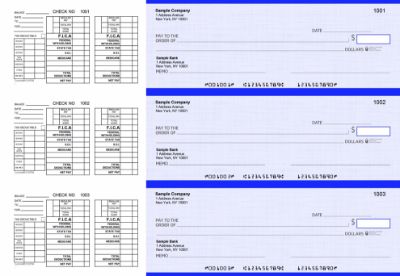
Checkomatic payroll checks with earnings stubs for employees who receive paper payroll checks rather than direct deposit.
As an employee, setting up direct deposit with a voided check is a four-step process handled between you and your employer's HR or payroll department.
Step 1: Get the Direct Deposit Authorization Form from Your Employer
Ask your HR or payroll department for the direct deposit enrollment form. This is a standard form that most employers maintain. Some larger companies use an online portal where you enter your banking information directly and the voided check is uploaded as a digital scan. Others require a physical paper form with a physical voided check attached. Confirm which method your employer uses before voiding a check.
Step 2: Void a Check from Your Checking Account
Follow the voiding steps above. Use a check from the same account where you want your paycheck deposited. If you want your paycheck split between two accounts, most employers allow you to specify a split on the form, but you will need a voided check from each account.
Step 3: Complete the Direct Deposit Authorization Form
Fill in the authorization form with the information from your voided check. The form typically asks for:
- Your full legal name as it appears on the bank account
- Your bank or credit union name
- Account type: checking or savings
- ABA routing number (9 digits from the MICR line, left group)
- Account number (from the MICR line, center group)
- Whether this is a new setup, a change, or a cancellation
- Your signature authorizing the employer to send deposits to this account
Attach the voided check to the completed form. The employer's payroll provider will verify the routing and account numbers from the check against what you wrote on the form before processing.
Step 4: Submit and Confirm the Effective Date
Submit the form to HR or payroll and ask when the direct deposit will take effect. Most employers process direct deposit setups within one to two pay periods. If your employer uses pre-note testing (covered below), add one extra pay period before the first full direct deposit arrives.
Employer: Step-by-Step Payroll Direct Deposit Setup
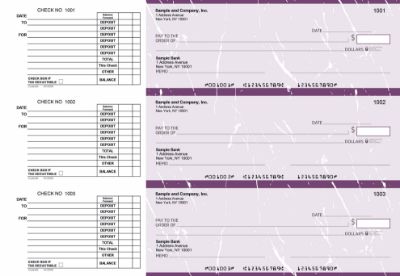
Checkomatic AP business checks for employers still writing physical checks for vendors and employees who prefer paper payroll checks.
As an employer, setting up direct deposit for your employees requires collecting their banking information, entering it into your payroll system, and initiating ACH transfers through your bank or payroll provider. A voided check from each employee is the most reliable way to collect accurate banking data.
Step 1: Collect Voided Checks and Signed Authorization Forms
Distribute direct deposit authorization forms to each employee who wants to enroll. Collect a completed and signed form with a voided check attached from each enrolling employee. For employees who do not have checks, accept the alternatives described in the section below. File the signed authorization forms in each employee's personnel record. These records are your authorization to initiate ACH credits to those accounts.
Step 2: Enter Banking Information into Your Payroll System
Enter each employee's routing number and account number into your payroll software exactly as they appear in the MICR line of the voided check. Double-check each number digit by digit against the physical check before saving. A single transposed digit routes the deposit to the wrong account or rejects it entirely. QuickBooks Payroll, Gusto, ADP, and most other payroll platforms have a dedicated direct deposit enrollment section under each employee's profile. The voided check is your source document, not the form the employee filled out, because a form can carry handwriting errors but the MICR line on the check cannot.
Step 3: Verify Your Own Business Bank Account ACH Setup
Your payroll system also needs your business bank account information to pull funds for the payroll run. This is typically set up once when you first configure payroll. If you are setting up payroll direct deposit for the first time, your bank may need to enable ACH origination on your business account. Contact your business bank and ask whether ACH credit origination is active on your account before your first payroll run.
Step 4: Run Pre-Notes or First Payroll
Some payroll systems automatically send a pre-note (zero-dollar test transaction) to verify each employee's routing and account numbers before the first real deposit. Others skip this step and process the first deposit immediately. If a pre-note comes back with a return code, the employee's banking information is incorrect and must be corrected before the next payroll run. See the pre-note section below for return codes and what they mean.
Step 5: Maintain Paper Payroll Checks as a Required Backup
Many states require employers to offer paper payroll checks as an alternative for employees who do not consent to direct deposit, are unbanked, or simply prefer a physical check. California, New York, and several other states explicitly prohibit mandatory direct deposit. Even where it is not legally prohibited, maintaining a supply of properly formatted payroll checks is a compliance requirement for many employers. For the complete guide to employer payroll check obligations, see business checks for payroll: the complete employer guide.
ACH Routing Number vs Paper Check Routing Number for Direct Deposit
This is the most commonly misunderstood part of setting up direct deposit with a voided check, and getting it wrong causes the first deposit to fail.
Most US banks use the same routing number for both paper check processing and ACH electronic transfers. For these banks, the routing number in the MICR line of your check is also the correct routing number for direct deposit setup. You give it to your employer and it works.
Large national banks, however, sometimes use different routing numbers for different transaction types: one for paper check clearing, one for ACH transfers, and sometimes a third for wire transfers. The routing number in your check's MICR line is the paper check routing number. If your bank uses a different routing number for ACH, submitting the paper check routing number for direct deposit will cause the deposit to fail or be misrouted.
How to Confirm the Correct ACH Routing Number
- Log in to your bank's online portal: Look under Account Details or Account Information. Most banks label the ACH routing number separately when it differs from the paper check routing number.
- Call your bank directly: Ask them to confirm the ACH routing number for direct deposit on your specific account type and in your specific state.
- Never use a routing number lookup website: These sites are frequently outdated and may return a routing number that applies to a different state or transaction type.
For the full explanation of ABA routing numbers, how to verify yours, and the difference between ACH and paper check routing numbers, see ABA routing numbers: what they are and how to verify yours and ABA routing number guide: where to find it and how it works.
How to Set Up Direct Deposit Without a Check
If you have no checks available because you just opened a new account, your current checkbook is empty, or you bank with a digital-only bank that does not issue physical checks, there are three reliable alternatives.
Alternative 1: Bank Letter on Official Letterhead
Request a letter from your bank on official letterhead that confirms your account holder name, routing number, and account number. Most banks provide this free of charge at a branch or through the business line. This letter is accepted by virtually all employers and payroll providers as an alternative to a voided check.
Alternative 2: Direct Deposit Authorization Form from Your Bank
Most banks have their own direct deposit enrollment form that shows your routing and account numbers in a standardized format. Download it from your online banking portal or pick it up at a branch. Some employers accept this form in lieu of a voided check, though others require the physical check specifically.
Alternative 3: Online Banking Portal Screenshot or Printout
For employers who accept digital verification, a screenshot or printout from your bank's online portal showing your routing and account numbers alongside your account holder name is often accepted. Confirm with HR whether this format is acceptable before submitting.
The Direct Deposit Authorization Form Explained
The direct deposit authorization form is the legal document you sign to authorize your employer to send ACH credits to your bank account. It is not a check and it is not a government form. It is a standard internal employer document that activates the direct deposit agreement between you, your employer, and both of your banks through the ACH network.
The form typically includes:
- Employee name and employee ID or Social Security Number (partial, for verification)
- Bank name and account type (checking or savings)
- ABA routing number
- Account number
- Deposit amount (full paycheck or a specified dollar amount if splitting between accounts)
- Effective date
- Employee signature authorizing the ACH credit
- Space to attach a voided check or bank letter
Under the Electronic Fund Transfer Act and NACHA rules, you must authorize direct deposit in writing before your employer can initiate ACH credits to your account. The signed authorization form is that written authorization. Keep a copy for your records. If you ever close or change accounts, you must submit a new form with updated information to cancel the old direct deposit and set up a new one.
Pre-Note Testing: What Happens Before Your First Direct Deposit
A pre-note (short for prenote) is a zero-dollar test transaction that many payroll systems send to the ACH network before processing the first real direct deposit to a new account. Its purpose is to verify that the routing number and account number you submitted actually correspond to a real, active account before your employer sends real payroll funds.
When your employer submits your voided check information and the payroll system sends a pre-note:
- The pre-note travels through the ACH network to your bank
- Your bank verifies the routing number and account number and confirms the account is open and active
- If the pre-note is accepted, your direct deposit is ready for the next payroll run
- If the pre-note returns with an error code, your employer's payroll team will contact you to verify your banking information
Common Pre-Note Return Codes and What They Mean
- R03 (No Account or Unable to Locate Account): The account number does not match any account at the bank identified by the routing number. Most common cause is a transcription error in the account number.
- R04 (Invalid Account Number): The account number format is not valid for that bank. May indicate a missing leading zero or an account number from a closed account.
- R07 (Authorization Revoked): Uncommon on pre-notes. Indicates the account holder has blocked ACH transactions on this account.
- R10 (Customer Advises Unauthorized): The account holder has disputed the authorization. This should not occur if the employee submitted the authorization form themselves.
If your direct deposit fails on the first attempt due to a pre-note error, your employer will typically issue a paper paycheck for that pay period while the banking information is corrected. This is why maintaining a supply of properly formatted payroll checks remains important even for businesses that primarily use direct deposit. For the full payroll check guide and format options, see business checks for payroll: the complete employer guide.
Setting Up Direct Deposit for Contractors and Vendors
The same process used for employee direct deposit applies to setting up ACH payments to independent contractors and vendors. Instead of a payroll direct deposit form, you use a vendor ACH authorization form or a W-9 combined with a direct deposit enrollment form.
Key differences from employee payroll direct deposit:
- Collect a W-9 first: For any contractor paid $600 or more annually, a signed W-9 is required for 1099-NEC reporting at year end. Collect this before the first payment.
- Request a voided check from the contractor: Ask the contractor to provide a voided check from their business account so you can verify their routing and account numbers before setting up ACH payments.
- No state consent laws apply: The state employee wage payment consent laws that restrict mandatory direct deposit for employees do not apply to independent contractors. You can require ACH payment for contractors.
- Maintain AP check backup: Some vendors and contractors prefer paper checks or may not have a business bank account set up for ACH. Maintaining a supply of manual accounts payable checks ensures you can always make timely payments regardless of the vendor's ACH status. For manual AP check options, see manual business checks.
How Long Does Direct Deposit Take After Submitting a Voided Check
| Scenario | Typical Timeline | Notes |
|---|---|---|
| Employer processes with pre-note | 2 pay periods | First pay period: pre-note. Second: full deposit |
| Employer processes without pre-note | 1 pay period | Direct deposit active on next scheduled payroll |
| Form submitted after payroll cutoff | 2 to 3 pay periods | Missed cutoff pushes enrollment to following pay period |
| Routing or account number error | 3 or more pay periods | Requires correction, resubmission, and another pre-note cycle |
The single biggest cause of delay is submitting banking information after the payroll cutoff date for that pay period. Ask your HR or payroll team for the cutoff date for direct deposit enrollment changes. Submitting the voided check and authorization form one day after the cutoff adds a full pay period to your wait.
Common Mistakes That Delay or Fail Direct Deposit Setup
Using the Deposit Slip Routing Number Instead of the Check Routing Number
As covered above, some banks print different routing numbers on deposit slips versus checks. Always use a voided check, not a deposit slip, for direct deposit setup.
Copying from an Online Lookup Site
Third-party routing number lookup websites are often outdated. Large banks have multiple routing numbers for different states and transaction types. Always use the number from your check's MICR line or your bank's online portal, not a lookup site.
Writing VOID Over the MICR Line
If VOID is written over the routing and account numbers at the bottom of the check, the payroll department cannot read the numbers and will reject the voided check. Write VOID across the upper portion of the check face only.
Submitting a Savings Account Number Instead of a Checking Account Number
Most direct deposit setups require a checking account. Some employers and payroll systems accept savings accounts, but many do not. If you want direct deposit to a savings account, confirm this is supported before submitting. If savings accounts are not accepted, you will need a checking account.
Not Updating Direct Deposit After Changing Banks
If you close a bank account or switch banks without updating your direct deposit information, your payroll deposits will either fail and be returned to your employer or, in some cases, continue depositing to the closed account until the bank returns them. Always submit a new voided check and authorization form before closing the old account.
Keeping Your Voided Check Secure
A voided check carries your ABA routing number and account number in a readable format. In the wrong hands, these two numbers are enough for someone to attempt an unauthorized ACH debit from your account. Handle voided checks with the same care you would give a signed check.
- Never email a voided check as an unprotected attachment. Email is not a secure transmission method for financial account information. If your employer requires a digital voided check, ask whether their HR system has a secure document upload portal, or submit a bank letter on letterhead through a secure channel.
- Shred voided checks you do not end up using. If you void a check and then decide to submit a bank letter instead, shred the voided check. Do not throw it in the recycling bin.
- Record the voided check number in your register. Note the check number as VOID in your check register so you can account for it during bank reconciliation. A missing check number flagged during reconciliation is how fraudulent checks get caught early.
For the complete check fraud protection guide, see are business checks safe: security features that actually matter.
How to Order Business Checks from Checkomatic
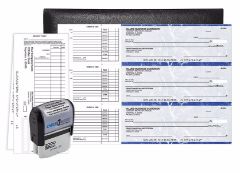
Manual business check starter pack from Checkomatic, for new businesses that need checks quickly for direct deposit setup, payroll, and vendor payments.
If your business needs checks for voiding for direct deposit documentation, payroll, or AP vendor payments, Checkomatic manufactures business checks to order with your company name, address, and banking details pre-printed in the MICR line.
What You Need to Order
- Your business legal name exactly as registered with your bank
- Your business address
- Your ABA routing number from an existing check or your bank's online portal
- Your business checking account number
- Your starting check number
- Your company logo file (black and white logo printing is free on every order)
Formats Available
For payroll checks with earnings stubs, see manual 3-on-page business payroll checks. For AP vendor payment checks, see manual 3-on-page accounts payable checks. For QuickBooks-integrated computer checks, see QuickBooks checks. For a first order to confirm format and quality, see manual business check starter pack.
Standard orders ship from Monroe, NY in 3 to 5 business days. Browse the full range at business checks.
What Customers Say About Checkomatic
All reviews below are published on checkomatic.com and reproduced verbatim. Source: checkomatic.com/quickbooks-starter-pack-product, 4.5 stars from 166 verified reviews.
"First time ordering and I am super impressed with the quality of the checks. No issues with delivery. I will be ordering again!"
TClinton | ★★★★★ 5/5 | April 9, 2025 | Source: checkomatic.com/quickbooks-starter-pack-product
"Been with them for 15 years. Always reliable, always good quality, good service. What more can you ask for?"
ATV Inc. | ★★★★★ 5/5 | April 5, 2024 | Source: checkomatic.com/quickbooks-starter-pack-product
"We use CheckoMatic for all of our check needs! They have great prices and we receive our products in a timely manner!"
CG's Tax Service | ★★★★★ 5/5 | September 18, 2024 | Source: checkomatic.com/quickbooks-starter-pack-product
"I got 500 checks for less than half of what the bank wanted for 200!"
VVA Voucher Checks (Vietnam Veterans of America) | ★★★★★ 5/5 | July 6, 2024 | Source: checkomatic.com/quickbooks-starter-pack-product
"ASJ Wilson Construction has been a client of checkomatic for some years now and they've never disappointed this company. Thank you checkomatic for all that you do."
ASJ Wilson Construction | ★★★★★ 5/5 | June 6, 2024 | Source: checkomatic.com/quickbooks-starter-pack-product
"Affordable and efficient. My go-to business check printer."
Doe | ★★★★★ 5/5 | January 24, 2025 | Source: checkomatic.com/quickbooks-starter-pack-product