Why Nonprofits Need Dedicated Business Checks
A nonprofit organization operates as a legal entity separate from its founders and board members. Even a small 501(c)(3) with an all-volunteer team and a modest annual budget handles financial transactions that require documentation: vendor invoices paid, contractor fees disbursed, staff payroll processed, volunteer expenses reimbursed, and supplies purchased. Every one of these payments needs a clear, traceable record.
Dedicated business checks for nonprofits serve this purpose in several ways that personal checks or cash payments cannot match.
IRS Financial Transparency and Form 990
501(c)(3) organizations file IRS Form 990 annually, which requires a detailed account of all income and expenses. Every disbursement made by check is documented with a check number, date, payee, and amount. A dedicated nonprofit checking account with properly ordered business checks creates the clean, chronological payment record that supports Form 990 preparation and reduces the accounting time required at year end. Mixed personal and organizational accounts create reconstruction work that costs more in accounting time than the entire annual check supply.
Donor and Board Accountability
Donors, grantors, and board members expect nonprofits to manage funds with transparency. A separate organizational checking account with checks that carry the nonprofit's name and logo signals that finances are managed as an independent organizational function, not co-mingled with personal accounts. When a major donor or foundation asks for financial statements, the check register from a dedicated nonprofit checking account is part of the documentation that demonstrates stewardship.
Annual Audits and Financial Reviews
Many nonprofits above a certain revenue threshold are required by state law, grant agreements, or board policy to undergo an annual independent financial audit or review. The auditor examines disbursements and requests documentation for individual payments. A check-based payment record is one of the clearest documentation trails an auditor can follow. Every check number corresponds to a transaction; every check stub carries the payee, date, and amount; every cancelled check returned by the bank confirms the payment was made and cleared.
Dual Signature Checks for Nonprofit Board Authorization
Many nonprofit boards require two authorized signatures on checks above a certain dollar threshold. This is a financial control measure that reduces the risk of a single individual making unauthorized disbursements without oversight. The dual signature requirement is documented in the nonprofit's bylaws or board financial policy and enforced at the check level.
How Dual Signature Checks Work
A dual signature check includes two signature lines on the face of the check rather than one. Both lines must be signed by authorized individuals before the check is valid for bank processing. The first signer is typically the treasurer or bookkeeper who initiates the payment. The second signer is typically the executive director, board chair, or another officer designated in the bylaws. Neither signature alone is sufficient for payment; the bank requires both.
When to Use Dual Signature Checks
Dual signature requirements vary by organization. Common policies include:
- All checks above a specified dollar amount require two signatures (for example, checks above $500 or $1,000)
- All checks require dual authorization regardless of amount
- Payroll checks are exempt from dual signature but all other disbursements require it
- Grant disbursements require dual authorization as a condition of the grant agreement
If your nonprofit's bylaws or board financial policy specifies a dual signature requirement, order checks with the dual signature line pre-printed. Checkomatic's multi-purpose manual business checks include the dual signature line option at no additional charge. For the full range of manual check formats with dual signature support, see multi-purpose manual business checks.
Manual vs Computer Checks for Nonprofits
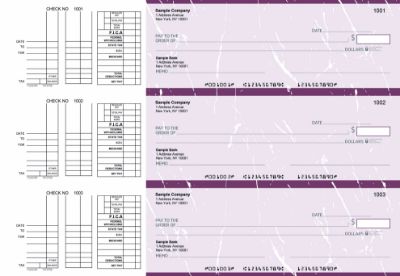
Manual business checks from Checkomatic , the right format for volunteer-run nonprofits, churches, and HOAs that write checks by hand without accounting software.
The choice between manual checks and computer checks for your nonprofit comes down to two questions: how many checks does your organization write per month, and do you use accounting software to manage finances?
| Factor | Manual Checks | Computer Checks |
|---|---|---|
| Best for | Small nonprofits, volunteer-run, low volume | Larger nonprofits, paid staff, software-managed accounts |
| Monthly check volume | Fewer than 20 per month | 20 or more per month |
| Software required | No , handwritten | Yes , QuickBooks, Xero, Quicken etc. |
| Printer required | No | Yes , laser or inkjet |
| Dual signature option | ✅ Yes , pre-printed at no extra cost | ✅ Yes , pre-printed at no extra cost |
| Carbon duplicate copy | Available , automatic record of every check | Software creates digital record automatically |
| Logo printing | ✅ Free B&W on every order | ✅ Free B&W on every order |
For the full manual check range including all formats, dual signature options, and carbon copy configurations, see manual checks. For the computer check range compatible with QuickBooks, Xero, and other accounting platforms, see computer checks.
Which Check Format Fits Your Nonprofit?
Beyond manual vs computer, the specific format within each category matters. Here is a quick guide to which format fits the most common nonprofit payment situations.
Voucher Check on Top (Computer Check)
The voucher check on top format is the standard for nonprofits using QuickBooks or another accounting platform to process AP payments. One check at the top of the sheet with two stubs below. One stub goes to the vendor with remittance detail. The second stub stays in your organizational files as the payment record. The stubs carry space for invoice numbers, payment dates, and reference notes that support your audit trail. For the voucher check format comparison, see voucher checks vs wallet checks: which is right for your business.
3-on-a-Page Manual Checks
The 3-on-a-page manual format is the most practical check format for smaller nonprofits, churches, and HOAs that write checks by hand. Three checks per full-size page with carbon duplicate copies. You write one check, the carbon records it automatically. One check goes to the vendor or payee. The duplicate stays in your files as the organizational record. No printer, no software, no setup. For the multi-purpose 3-on-page format, see multi-purpose manual business checks.
Executive Deskbook Manual Checks
The executive deskbook format is a portable manual check in a compact binder. Useful for nonprofit executive directors, church pastors, or HOA officers who write checks at meetings, events, or locations away from the office. Same pre-printed organization name, logo, and banking details as any Checkomatic business check, in a format that fits in a briefcase or bag.
Business Checks for Churches and Religious Organizations
Churches, mosques, synagogues, temples, and other religious organizations share many of the same check writing needs as other nonprofits, with a few additional considerations.
Common Church Check Payments
- Vendor and supplier invoices: utilities, maintenance, office supplies, printing
- Contractor payments: building maintenance, construction, landscaping
- Staff payroll: pastors, music directors, administrative staff, youth workers
- Volunteer reimbursements: travel, materials, event expenses
- Ministry disbursements: benevolence funds, outreach programs, mission support
Dual Signature Requirements in Church Governance
Many churches require two signatures on checks as a matter of denominational policy or internal governance. The treasurer and a church elder, deacon, or board member typically co-sign checks above a set amount. This practice protects the church from the risk of financial mismanagement by any single individual and demonstrates financial accountability to the congregation. Checkomatic's manual business checks include the dual signature line option for exactly this use case.
Check Volume at Churches
Most smaller churches write between 5 and 20 checks per month. At this volume, manual checks are typically the most practical format. Larger churches with dedicated administrative staff, formal accounting software, and regular payroll may benefit from computer checks in voucher format. The right choice depends on how your church's financial administration is structured.
Business Checks for HOAs and Condo Associations
Homeowners associations, condo associations, and property management organizations collect regular dues from members and disburse funds for maintenance, repairs, management fees, landscaping, insurance, and capital improvements. This creates a consistent, moderate-volume check writing need that business checks are well suited to serve.
Common HOA and Condo Association Check Payments
- Property maintenance and repair contractors
- Landscaping and grounds care vendors
- Insurance premium payments
- Property management company fees
- Utility payments for common areas
- Reserve fund contributions and capital improvement disbursements
- Administrative and accounting service fees
Financial Accountability to Members
HOA and condo association members pay regular dues and expect transparent accounting of how those funds are spent. A dedicated association checking account with business checks that carry the organization's name and logo supports the financial reporting that members receive at annual meetings. Every check paid from the account is traceable, numbered, and documented, making it simple to produce the expense reports that member meeting financial summaries require.
Payroll Checks for Nonprofits With Paid Staff
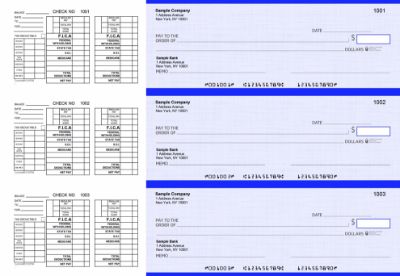
Payroll business checks from Checkomatic , for nonprofits with paid staff including executive directors, church employees, and HOA administrators.
Not all nonprofits are all-volunteer operations. Many 501(c)(3) organizations employ paid executive directors, administrative staff, program coordinators, social workers, teachers, pastors, and part-time workers. These employees are paid just like employees of any for-profit business: subject to payroll tax withholding, documented on a regular pay cycle, and entitled to a pay stub showing gross pay, deductions, and net pay.
Payroll Check Requirements for Nonprofits
Nonprofit payroll checks need the same information as any business payroll check:
- Employee name as the payee
- Pay period dates
- Gross pay, deductions, and net pay on the stub
- Organization name and bank details pre-printed
- Sequential check numbering for payroll records
Payroll Check Format for Nonprofits
The 3-on-a-page payroll manual check format is well suited for nonprofits that run manual payroll for a small number of employees. The stub above each check carries space for pay period detail, deductions, and net pay. For nonprofits using payroll software, computer checks in voucher format integrate the print run directly with the payroll software, automatically filling in all variable fields. For the complete payroll check guide, see business checks for payroll: the complete employer guide.
Check Fraud Protection for Nonprofits
Nonprofit organizations are not immune to check fraud. In fact, smaller nonprofits with informal financial controls, volunteer treasurers, and less formal oversight can be more vulnerable to both external check fraud and internal misappropriation than established businesses with formal financial controls.
External Check Fraud Risks
Check washing , the practice of chemically removing ink from a check and rewriting the payee and amount , targets any organization that mails checks regularly. A check mailed to a vendor can be intercepted, washed, and redeposited with a different payee and a higher amount. Quality check paper from Checkomatic includes chemical-reactive paper that stains visibly when washing solvents are applied, making any alteration attempt visible before the check is processed. For the complete guide to check fraud and protection, see are business checks safe: security features that actually matter.
Internal Control Measures
Dual signature requirements, as discussed above, are one of the most effective internal controls available to nonprofits. Positive pay is a bank-side service that compares each presented check against a list of checks your organization has issued, flagging any check that does not match for manual review before payment. For the complete positive pay guide, see what is positive pay and how does it work.
Secure Check Storage
Blank check stock with your nonprofit's name, account number, and routing number pre-printed is a high-value fraud target. Store all check stock in a locked cabinet or safe when not in use. Limit access to the individual or individuals formally authorized to write checks. Record the starting and ending check numbers for each order and reconcile the check register regularly to confirm all check numbers are accounted for. For the reconciliation guide, see checkbook management: how to balance and reconcile.
How to Order Business Checks for Your Nonprofit
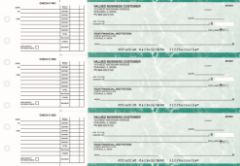
AP business checks from Checkomatic , pre-printed with your nonprofit's name, logo, and banking details, with dual signature line and full security features on every order.
What You Need Before Ordering
- Your organization's legal name: Exactly as registered with the IRS and your bank. The name on the check must match the bank account registration.
- Your organization's address: The mailing address registered to the nonprofit checking account.
- Your bank's ABA routing number: Nine digits from the lower-left of an existing check or from your bank's online portal.
- Your checking account number: From an existing check or your bank's online banking account details.
- Starting check number: One higher than the last check used, to maintain sequential numbering for your financial records.
- Your organization's logo file: Black and white logo printing is free on every Checkomatic order.
- Dual signature preference: Specify at checkout if your bylaws or board policy require two signature lines.
Ordering Quantity for Nonprofits
Most smaller nonprofits, churches, and HOAs write between 5 and 30 checks per month. At 15 checks per month, a 250-check order lasts about 16 months. This is a reasonable quantity: enough to avoid frequent reorders but not so large that you risk holding outdated check stock if your banking details or organization address changes. For complete ordering quantity guidance, see what is the best place to order checks online.
What Customers Say About Checkomatic
All reviews below are published on checkomatic.com and reproduced verbatim. Source: checkomatic.com/quickbooks-starter-pack-product, 4.5 stars from 166 verified reviews.
"Been with them for 15 years. Always reliable, always good quality, good service. What more can you ask for?"
ATV Inc. | ★★★★★ 5/5 | April 5, 2024 | Source: checkomatic.com/quickbooks-starter-pack-product
"First time ordering and I am super impressed with the quality of the checks. No issues with delivery. I will be ordering again!"
TClinton | ★★★★★ 5/5 | April 9, 2025 | Source: checkomatic.com/quickbooks-starter-pack-product
"We use CheckoMatic for all of our check needs! They have great prices and we receive our products in a timely manner!"
CG's Tax Service | ★★★★★ 5/5 | September 18, 2024 | Source: checkomatic.com/quickbooks-starter-pack-product
"I got 500 checks for less than half of what the bank wanted for 200!"
VVA Voucher Checks (Vietnam Veterans of America) | ★★★★★ 5/5 | July 6, 2024 | Source: checkomatic.com/quickbooks-starter-pack-product
"ASJ Wilson Construction has been a client of checkomatic for some years now and they've never disappointed this company. Thank you checkomatic for all that you do."
ASJ Wilson Construction | ★★★★★ 5/5 | June 6, 2024 | Source: checkomatic.com/quickbooks-starter-pack-product
"Affordable and efficient. My go-to business check printer."
Doe | ★★★★★ 5/5 | January 24, 2025 | Source: checkomatic.com/quickbooks-starter-pack-product
Why Choose Checkomatic for Nonprofit Business Checks
Dual Signature Line at No Extra Charge
Nonprofit boards that require two authorized signatures on outgoing checks can add the dual signature line to any Checkomatic manual business check order at checkout. It prints on every check in the order at no additional cost. This is one of the most requested features for church, HOA, and nonprofit check orders. For multi-purpose manual checks with dual signature support, see multi-purpose manual business checks.
Free Logo Printing on Every Order
Black and white logo printing is included on every Checkomatic business check order at no extra charge. For nonprofits that want checks to carry their organization's logo, this feature is available without an additional fee. Color logo printing is also available as a low-cost add-on. Every order includes 20 background color and style options so your checks reflect your organization's identity.
All Security Features as Standard
Every Checkomatic business check , manual or computer, nonprofit or for-profit , includes the full standard security feature set: chemical-reactive paper, microprinting, void pantograph, heat-sensitive ink, true watermark, and coin-reactive ink. These features are not optional upgrades. They are standard on every order at the base price. For the full security feature guide, see are business checks safe: security features that actually matter.
Budget-Friendly Pricing for Cost-Conscious Nonprofits
Nonprofits operate on carefully managed budgets. Ordering check stock directly from a printer, rather than through a bank, significantly reduces the per-check cost. Bulk order discounts reduce the cost further for organizations that order in larger quantities. For the complete ordering and cost guide, see what is the best place to order checks online.