Quick Answer: The most important features of a business check are: perforated edges for clean stub separation, laser and inkjet printer compatibility, accounting software compatibility, two stubs for payer and payee records, and a complete set of security features starting with Check-21 compliance, coin reactive ink, micro-printed border, and void pantograph. High-security checks add heat-sensitive ink, two-colored background, endorsement area seal, and colored signature area. As the original content correctly identifies, Checkomatic's products meet all of the above important feature standards.
What a Check Is and Why Features Matter
A check is simply a written, dated, and signed instrument that directs a bank to pay a specific sum of money to the bearer. It is defined as another way to instruct a bank to transfer funds from the payor's account to the payee or that person's account, according to Investopedia.
Checks today remain useful for many businesses running payroll based on matters of familiarity, universality, and their anticipated budget.
Format Features: What Makes a Check Operationally Useful
So what are the most important features of a business check? The first category covers the operational features , the design elements that make a check practical to use in a business payment workflow.
- Perforated edges
- Laser/inkjet compatibility
- Software compatibility
- 2 stubs for both to keep
- 2 signature lines if needed
Standard Security Features: What Every Check Should Have
Standard and high-security features on Checkomatic business checks , included as standard, not as an upgrade.
Security is definitely a high priority. But what security features do you need to look for with your checks?
- Check-21 Compliance
- Security Box Features
- Coin Reactive Ink
- Erasure Highlighting
- Front Security Warning
- Micro-Printed Border
- Artificial Watermark
- "Void" When Copied
High-Security Features: When to Upgrade
- Heat Sensitive Ink
- Two Colored Background
- Endorsement Area Pattern
- Endorsement Area Seal
- Colored Signature Area
Lucky for our customers, and all business checks buyers, Checkomatic's products meet all of the above important features standards!
Browse business checks, computer checks, or manual checks at Checkomatic.
What Each Security Feature Does
The original content correctly lists every standard and high-security feature on Checkomatic's business checks. Here is what each feature actually does to protect your payment from fraud.
Standard Security Features , Explained
| Feature | What It Does |
|---|---|
| Check-21 Compliance | Ensures the check can be processed electronically as a substitute check under the Check Clearing for the 21st Century Act. All US bank automated sorting systems require this for standard processing. |
| Security Box Features | A printed security description box on the check (typically on the back) listing all security features present. This tells the bank's fraud detection system what to look for when verifying the check. |
| Coin Reactive Ink | A chemical in the check paper produces a color change when rubbed with a coin or hard metal object. Bank tellers use this as an instant authenticity test for suspicious checks. |
| Erasure Highlighting | The check paper changes color visibly when any content is erased or chemically altered. Any attempt to change the payee name or amount leaves a stain or color change that cannot be hidden. |
| Front Security Warning | A printed band or border on the front of the check listing the security features present. Alerts handlers that this check contains multiple fraud deterrents. |
| Micro-Printed Border | What appears to be a simple line border is actually tiny repeating text readable only under magnification. Standard photocopiers and scanners render it as a broken or blurred line, which bank fraud systems flag as a reproduction. |
| Artificial Watermark | A design visible when the check is held to light at an angle. Unlike an authentic paper watermark embedded in the paper itself, this is printed but still provides a visible fraud indicator that differs on originals vs reproductions. |
| "Void" When Copied | A void pantograph: a background pattern nearly invisible on the original check that causes the word VOID to appear clearly when the check is photocopied or scanned. Any photocopy will immediately show as a reproduction. |
High-Security Features , Explained
| Feature | What It Adds |
|---|---|
| Heat Sensitive Ink | A thermal element (typically a small icon or dot) disappears when pressed with a warm thumb. Bank tellers use this as an additional authenticity test. Reappears when cooled. Cannot be replicated without the specific ink formulation. |
| Two Colored Background | A dual-color printed background pattern that is more difficult to reproduce accurately on a standard photocopier or printer. The two-tone pattern creates a visual reference that distinguishes originals from reproductions. |
| Endorsement Area Pattern | A printed pattern in the endorsement area on the back of the check. Any attempt to erase or alter an endorsement disrupts this pattern visibly, flagging tampering before the check is processed. |
| Endorsement Area Seal | A secondary security layer in the endorsement area that makes unauthorized endorsement alterations more visible and harder to conceal during bank processing. |
| Colored Signature Area | A tinted signature block that makes it visible if the area has been erased or chemically treated to remove an original signature and replace it with a fraudulent one. |
For the complete guide to which security features actually matter and which are marketing theater, see are business checks safe: security features that actually matter.
Standard vs High-Security Checks: How to Decide
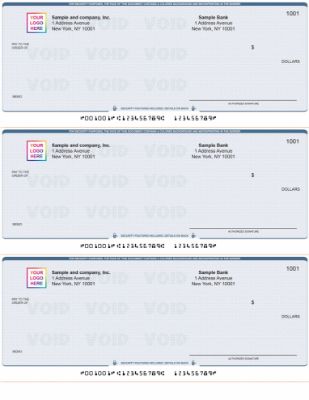
Standard Checkomatic business checks with all 8 standard security features included on every order at the base price.
Standard security checks include the eight features listed in the original content: Check-21 compliance, security box, coin reactive ink, erasure highlighting, front security warning, micro-printed border, artificial watermark, and void pantograph. This level of security is sufficient for the majority of business payment situations.
High-security checks add five additional features: heat-sensitive ink, two-colored background, endorsement area pattern, endorsement area seal, and colored signature area. The original content correctly lists all of these as Checkomatic features.
When Standard Security Is Sufficient
- Payments to established vendors you have paid reliably before
- Payroll checks delivered in-person or through a secure internal distribution
- Checks for amounts below $5,000
- Businesses using positive pay as an additional bank-side protection layer
- Businesses that have not experienced check fraud previously
When to Consider High-Security Checks
- Checks regularly mailed to new or unfamiliar recipients
- Checks for amounts of $5,000 or more
- Businesses that have experienced check washing, counterfeiting, or unauthorized account use
- Real estate, legal, and title company payments where checks change hands multiple times
- Industries where check fraud rates are historically higher, such as healthcare and construction
Format Features Explained: What to Check Before Ordering
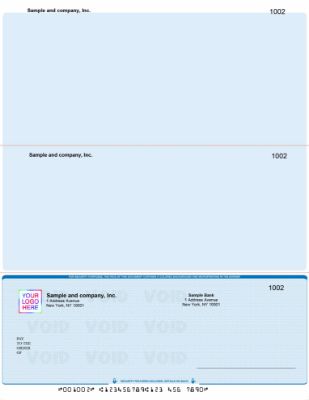
Checkomatic computer checks show all key format features: perforated edges, laser compatibility, software compatibility, and dual stubs.
The original content correctly identifies the five key format features. Here is why each one matters in practice.
Perforated Edges
Perforations are the small dotted lines between the check and each stub. A clean, precise perforation allows the check and stubs to be separated without tearing the printed information. Poorly perforated checks tear unevenly and can damage the MICR line or stub detail. Every Checkomatic business check includes properly aligned perforations for clean separation.
Laser and Inkjet Compatibility
Computer checks need to pass through a printer without jamming or degrading the paper. Laser printers use heat and pressure; inkjet printers use wet ink. The check paper must handle both without the security features degrading during printing. Checkomatic's check stock is compatible with both laser and inkjet printers. For the complete guide to printing checks from your computer, see MICR line explained: the technology behind every check.
Software Compatibility
The check's physical format must match your accounting software's print template. QuickBooks uses check-on-top format. Sage 50 uses check-in-middle. The check stock must align with the software's output coordinates or every print run will misalign. Checkomatic pre-formats checks for QuickBooks, Quicken, Sage, MYOB, Peachtree, and most other major platforms. For the complete software compatibility guide, see types of checks: every check type and term explained.
Two Stubs
As the original content correctly identifies, business checks come with two stubs , one for the payer to keep and one for the payee. Each stub carries the payment detail: payee name, amount, date, invoice reference, and memo. This two-copy documentation system creates a physical paper trail for both sides of every transaction, which is essential for AP reconciliation and audit readiness.
Dual Signature Lines
As the original content correctly identifies, dual signature lines are available when needed. Many businesses require two authorized signatories for checks above a certain dollar threshold as an internal control against unauthorized payments. The dual signature line is a pre-printed line that signals to the payee and the bank that two signatures are required. This must be specified when ordering. For check washing protection and why mailing is the highest-risk step in check delivery, see what is check washing and how to protect your business.
What Customers Say About Checkomatic
All reviews below are published on checkomatic.com and reproduced verbatim. Source: checkomatic.com/quickbooks-starter-pack-product, 4.5 stars from 166 verified reviews.
"Been with them for 15 years. Always reliable, always good quality, good service. What more can you ask for?"
ATV Inc. | ★★★★★ 5/5 | April 5, 2024 | Source: checkomatic.com/quickbooks-starter-pack-product
"First time ordering and I am super impressed with the quality of the checks. No issues with delivery. I will be ordering again!"
TClinton | ★★★★★ 5/5 | April 9, 2025 | Source: checkomatic.com/quickbooks-starter-pack-product
"We use CheckoMatic for all of our check needs! They have great prices and we receive our products in a timely manner!"
CG's Tax Service | ★★★★★ 5/5 | September 18, 2024 | Source: checkomatic.com/quickbooks-starter-pack-product
"I got 500 checks for less than half of what the bank wanted for 200!"
VVA Voucher Checks (Vietnam Veterans of America) | ★★★★★ 5/5 | July 6, 2024 | Source: checkomatic.com/quickbooks-starter-pack-product
"ASJ Wilson Construction has been a client of checkomatic for some years now and they've never disappointed this company. Thank you checkomatic for all that you do."
ASJ Wilson Construction | ★★★★★ 5/5 | June 6, 2024 | Source: checkomatic.com/quickbooks-starter-pack-product
"Affordable and efficient. My go-to business check printer."
Doe | ★★★★★ 5/5 | January 24, 2025 | Source: checkomatic.com/quickbooks-starter-pack-product
Why Choose Checkomatic for Business Checks With All the Right Features
All Features Standard , No Stripped-Down Base Tier
As the original content correctly identifies, Checkomatic's products meet all of the important feature standards. Every order includes the full standard security feature set: Check-21 compliance, security box, coin reactive ink, erasure highlighting, front security warning, micro-printed border, artificial watermark, and void pantograph. These are not premium add-ons. They are included at the base price on every business check order from Checkomatic.
High-Security Upgrade Available on All Check Types
The high-security features listed in the original content , heat-sensitive ink, two-colored background, endorsement area pattern and seal, colored signature area , are available as an upgrade on all Checkomatic business check formats. For the complete guide to which features matter most for different risk situations, see are business checks safe: security features that actually matter.
Positive Pay Compatible
Checkomatic's business checks include ANSI E13-B certified MICR encoding on every order. This ensures your checks are compatible with positive pay services offered by all major US banks. Positive pay is the most effective bank-side complement to check stock security features: your bank matches every check presented against your issued check file before releasing payment. For the complete positive pay guide, see what is positive pay and how does it work.