Quick Answer: Personal checks are compact and portable, with a single stub for expense tracking. Business checks are larger, include two stubs, align with accounting software like QuickBooks, and offer dual signature line options. As the original content correctly identifies, if you want to carry checks and write them without access to a computer or printer, personal checks are your choice. If you need to pay bills, vendors, or payroll, business checks are the right tool.
For more detail, see QuickBooks checks comparison chart.
What Are Personal Checks?
At Checkomatic, businesses can choose from personal computer checks or manual personal checks. Compliant with the American Bankers Association regulations and security standards, our Personal Checks contain sophisticated security features to safeguard your business from bank fraud. No checks can be scanned by forgers.
Key Features:
- Small and compact to carry
- You have a small stub next to each check where you can track your expenses
What Are Business Checks?
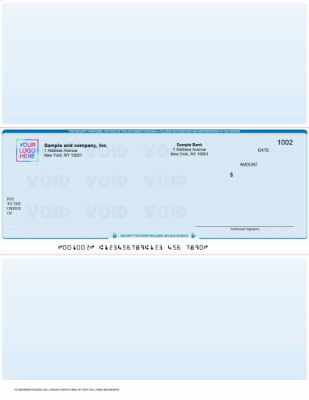
Business checks from Checkomatic in voucher format , two stubs for payer and payee, compatible with QuickBooks and major accounting software.
When it comes to running a business, there are some office items every business owner must keep in stock. One of those necessary items includes business checks. At Checkomatic, we've got just what you need , business checks. Suitable for a wide range of payments, including accounts payable and payroll, our business checks will keep your accounting department running smoothly.
Key Features:
- Business checks will usually come with 2 stubs so you can keep one and send one to the vendor, employee, etc.
- They will match all the major accounting software platforms like QuickBooks, Xero, NetSuite, etc.
- You can order with lines or without, so you can write them out manually if you want
- You have the option to add 2 signature lines if your check has to be signed by more than 1 person
How Do You Know Whether a Personal or Business Check Is Right for You?
It depends on your need. If you want to carry checks and write them out without having access to a computer or printer, then a personal check would be your choice. On the other hand, if you want to pay bills, vendors, or payroll, then a business check would be your choice.
Unlike bank-issued checks, our personal checks are extremely affordable. The best part is that you can save more money by ordering in bulk.
Browse business checks, computer checks, manual checks, and personal checks at Checkomatic.
Full Comparison: Personal Checks vs Business Checks
| Feature | Personal Check | Business Check |
|---|---|---|
| Size and format | Compact wallet or pad format | Full-size 8.5 x 11 or binder format |
| Stubs | 1 small stub per check | 2 stubs , one for payer, one for payee |
| Software compatible | No , handwritten only | Yes , QuickBooks, Xero, NetSuite, etc. |
| Dual signature line | No | Optional , can be added to order |
| Best use | Personal payments, small purchases, portable use | Payroll, AP, vendor payments, accounting runs |
| Printer required | No , handwritten | Optional , print or write manually |
| Security features | ✅ Standard on all Checkomatic checks | ✅ Standard + high-security option |
| Bank acceptance | All major US banks | All major US banks |
| Bulk discounts | ✅ Yes , order more, pay less per check | ✅ Yes , order more, pay less per check |
When Personal Checks Are the Right Choice
As the original content correctly identifies, if you want to carry checks and write them out without access to a computer or printer, a personal check is your choice. Here are the specific situations where personal checks make the most sense.
Portable Use Away From the Office
Personal checks are compact enough to fit in a wallet, purse, or small bag. If you frequently need to write checks at locations outside your office , at appointments, in the field, at client locations, or on the go , a personal check binder or pad is easier to carry than a full business check binder. The small stub next to each check lets you note the date, payee, and amount for your records immediately after writing.
Low-Volume Personal or Small Business Payments
For individuals or sole proprietors who write only a handful of checks per month, a personal check covers most payment needs without the additional features of a business check format. Personal checks are legally valid for any payment a business check is valid for. The difference is operational convenience, not legal status.
Budget-Conscious First-Time Check Orders
As the original content correctly identifies, unlike bank-issued checks, Checkomatic personal checks are extremely affordable. For individuals or new small businesses setting up their first check supply, personal checks are a cost-effective starting point with bulk discounts available as volume increases. For personal check options at Checkomatic, see personal checks.
When Business Checks Are the Right Choice
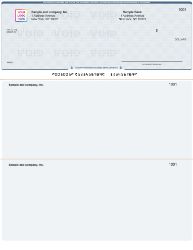
Business checks in QuickBooks voucher format from Checkomatic , two stubs, accounting software alignment, and dual signature line option.
As the original content correctly identifies, if you need to pay bills, vendors, or payroll, business checks are your choice. Here is the specific detail behind each of those use cases.
Payroll
Payroll checks in voucher format include pre-printed or blank stub fields for gross pay, deductions, and net pay. The employee receives one stub with their check as a pay stub record. The employer retains the second stub as their accounting copy. This documentation is what many states require employers to provide as a pay stub disclosure. Personal checks do not include this remittance structure. For the complete payroll check guide, see business checks.
Vendor Payments and Accounts Payable
Business checks in voucher format carry remittance detail on the stubs , invoice numbers, purchase order references, payment period, and deduction descriptions. The vendor receives one stub with the check for their records. The payer retains the second stub. This documentation supports both parties' reconciliation. Personal checks have a single small stub that holds much less detail.
Checks Requiring Two Signatories
As the original content correctly identifies, business checks can be ordered with two signature lines for checks that require more than one authorized signatory. Many businesses require dual authorization for checks above a certain dollar amount as an internal control against unauthorized payments. Personal checks do not offer this option. The dual signature line must be specified when placing your business check order with Checkomatic.
Accounting Software Integration
As the original content correctly identifies, business checks match all major accounting software platforms including QuickBooks, Xero, and NetSuite. When your accounting software prints the check, it fills in the payee, date, amount, and memo automatically. Personal checks are not formatted for software printing. For businesses processing more than 10 to 20 check payments per month, printing from accounting software saves significant time over handwriting each check. For the complete format guide, see voucher checks vs wallet checks: which is right for your business.
Software Compatibility for Business Checks
As the original content correctly identifies, business checks match all the major accounting software platforms. Here is the specific compatibility list for Checkomatic business checks.
- QuickBooks Desktop and Online: All versions. Pre-formatted to QuickBooks' check-on-top and 3-on-a-page print layouts. For QuickBooks-specific check formats, see QuickBooks checks.
- Xero: Standard check format compatible with Xero's check print module.
- NetSuite: Compatible with NetSuite's AP check printing format.
- MYOB: Pre-formatted to MYOB standard check dimensions.
- Peachtree / Sage 50: Compatible with Peachtree and Sage 50 check printing.
- Microsoft Dynamics: Compatible with Dynamics GP and Business Central check print settings.
- Other software: If your software is not listed, Checkomatic custom-formats your checks at no extra charge.
Security Features on Checkomatic Checks
As the original content correctly identifies, both personal and business checks at Checkomatic contain sophisticated security features to safeguard against bank fraud and prevent checks from being scanned by forgers. Here is what those features include on every order.
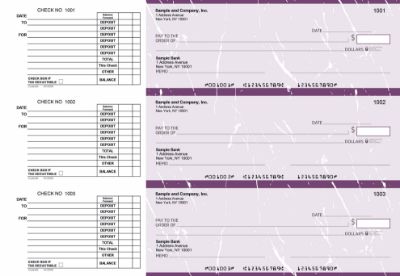
Manual executive deskbook checks from Checkomatic , compact format with security features, ideal for portable personal and small business check writing.
- American Bankers Association compliance: As the original content correctly identifies, Checkomatic's personal checks comply with American Bankers Association regulations and security standards. This compliance applies to all check types, ensuring every check meets the banking industry's requirements for fraud protection and MICR encoding.
- Chemical-reactive paper: The check paper contains reactants that stain visibly when exposed to check-washing solvents, revealing any alteration attempt before the bank processes the check.
- Void pantograph: A background pattern that causes VOID to appear when the check is photocopied or scanned, deterring counterfeit reproduction.
- Microprint signature line: The signature line is printed in microtext that blurs on photocopies and scans, providing a visual indicator of authenticity that forgers cannot replicate with standard equipment.
- ANSI E13-B certified MICR encoding: Every Checkomatic check is encoded with iron-oxide MICR ink certified to ANSI E13-B standards, ensuring automated processing by all US bank sorting systems.
For the complete guide to check security features and which matter most for fraud prevention, see are business checks safe: security features that actually matter.
What Customers Say About Checkomatic
All reviews below are published on checkomatic.com and reproduced verbatim. Source: checkomatic.com/quickbooks-starter-pack-product, 4.5 stars from 166 verified reviews.
"Been with them for 15 years. Always reliable, always good quality, good service. What more can you ask for?"
ATV Inc. | ★★★★★ 5/5 | April 5, 2024 | Source: checkomatic.com/quickbooks-starter-pack-product
"First time ordering and I am super impressed with the quality of the checks. No issues with delivery. I will be ordering again!"
TClinton | ★★★★★ 5/5 | April 9, 2025 | Source: checkomatic.com/quickbooks-starter-pack-product
"We use CheckoMatic for all of our check needs! They have great prices and we receive our products in a timely manner!"
CG's Tax Service | ★★★★★ 5/5 | September 18, 2024 | Source: checkomatic.com/quickbooks-starter-pack-product
"I got 500 checks for less than half of what the bank wanted for 200!"
VVA Voucher Checks (Vietnam Veterans of America) | ★★★★★ 5/5 | July 6, 2024 | Source: checkomatic.com/quickbooks-starter-pack-product
"ASJ Wilson Construction has been a client of checkomatic for some years now and they've never disappointed this company. Thank you checkomatic for all that you do."
ASJ Wilson Construction | ★★★★★ 5/5 | June 6, 2024 | Source: checkomatic.com/quickbooks-starter-pack-product
"Affordable and efficient. My go-to business check printer."
Doe | ★★★★★ 5/5 | January 24, 2025 | Source: checkomatic.com/quickbooks-starter-pack-product
Why Choose Checkomatic for Personal and Business Checks
Both Check Types at the Same Trusted Source
Checkomatic supplies both personal checks and business checks, meaning you can order everything your business needs from a single supplier. Whether you need compact personal checks for portable use, voucher business checks for QuickBooks AP runs, or payroll checks with pre-printed stub fields, the same order process, the same customer service team, and the same security standards apply to every order.
ABA Compliant Security on Every Order
As the original content correctly identifies, Checkomatic's personal checks are compliant with American Bankers Association regulations and security standards. This compliance extends to all check types. Every check order , personal or business , ships with the fraud protection features that ABA standards require and that US banks look for in the checks they process.
More Affordable Than Bank-Issued Checks
As the original content correctly identifies, unlike bank-issued checks, Checkomatic's personal and business checks are extremely affordable. Banks charge $20 to $35 for a book of personal checks at the branch. Checkomatic's checks cost a fraction of that per check and offer bulk order discounts that reduce the per-check price further as your order quantity increases. For the complete ordering and pricing guide, see what is the best place to order checks online.
Customer Service Team Ready to Help
If you are unsure whether a personal or business check format is right for your specific situation, Checkomatic's customer service team is available to help. They can review your accounting software, payment volume, and use case and recommend the exact format, stub style, and customization options that match your needs before you place your first order.